
Developer tool · Open source
VueForge
The rapid Vue 3 component & widget engine for October CMS backend interfaces.

Overview
What VueForge does
Drop a real Vue 3 single-file component into any October CMS backend form as a FormWidget, with props, JSON save and load, and two-way sync already wired up.
- Vue 3 single-file components (script setup, TypeScript) compiled by Vite
- Two-way v-model sync with the form's native submit
- Saved values are parsed and sanitized server-side before they are stored
- php artisan vueforge:make scaffolds a new widget and its component
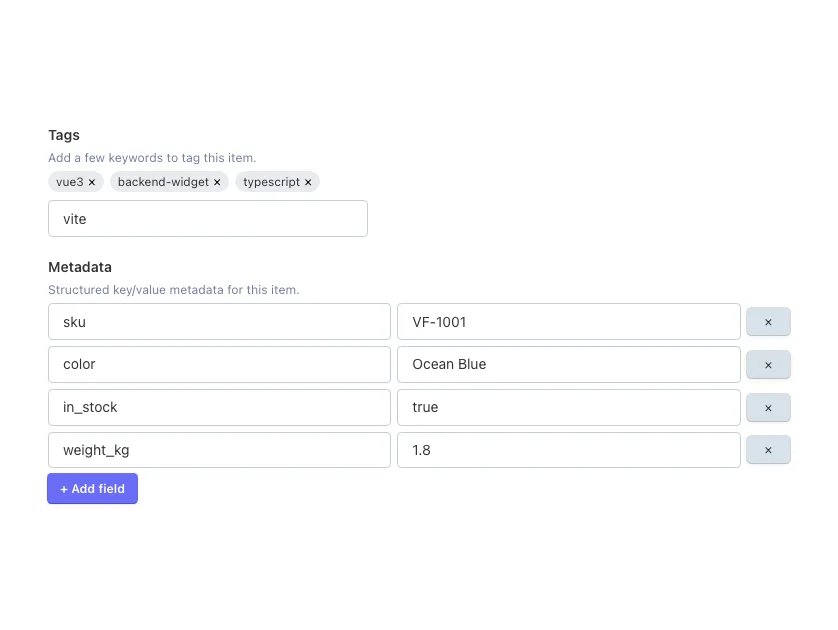
- TagInput and JsonEditor example widgets included
- Works on JSON columns and plain text columns, including Tailor fields
Requirements
- October CMS 4.2+
- PHP 8.2+
Installation
Install from the October CMS Marketplace, or with Composer. Plugin code AmjadIqbal.VueForge, installed to plugins/amjadiqbal/vueforge. The compiled assets ship in assets/dist/: you only need npm and Vite (Node 18+) when you build your own components.
composer require amjadiqbal/vueforge-pluginUsage
Use the vueforge field type in any fields.yaml. TagInput (array state) and JsonEditor (nested key/value state) ship as working examples.
tags:
    label: Tags
    type: vueforge
    component: TagInput
    props:
        placeholder: "Add a tag..."

metadata:
    label: Metadata
    type: vueforge
    component: JsonEditor
Field options
- component (default JsonEditor): the Vue component to mount.
- viteEntry (default assets/vue/components/{component}.vue): the source path used to find the built asset in Vite's manifest.
- props: extra static props, merged with the field value (passed as modelValue).
Scaffold your own widget
Generates a VueWidget subclass and a <script setup lang="ts"> component already wired to useVueForge(). Register the FormWidget in your plugin as usual.
php artisan vueforge:make Acme.Blog TagListHow a value round-trips
- 1 Load: the widget reads the attribute, JSON-encodes it and renders it into the mount point and a hidden input.
- 2 Hydrate: the hydrator finds the mount point, imports the named component and mounts it with the props.
- 3 Edit: useVueForge() gives the component a reactive value; every change is written back to the hidden input.
- 4 Save: the form posts the JSON; the widget parses and sanitizes it (malformed JSON is rejected, only plain array and scalar data is kept) before it is stored.
Storage
Works on JSON-cast attributes ($jsonable or a native JSON column) and on plain text columns such as Tailor blueprint fields, where the value is stored as a JSON string and decoded when the form loads.
Support
Report bugs and request features on GitHub Issues, or get in touch for custom work.
Custom October CMS development
Need VueForge customised, or a plugin of your own?
Custom plugins, backend form widgets and Tailor setups, built and tested on a real October install. Tell me what you need and get a plan and a quote, free.